Please note that the following applies only to applicants for the Community Action Grant or AAUW Branch and Affiliate Grants.
Try these steps to troubleshoot:
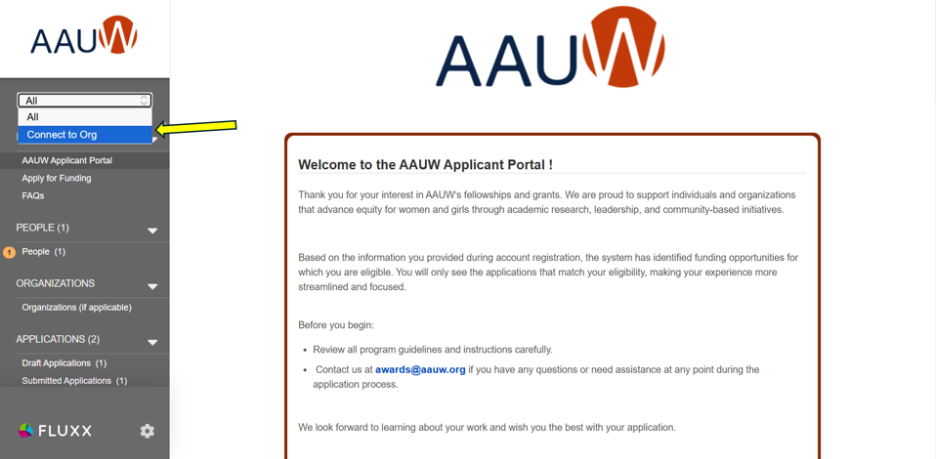
- Click on the drop-down menu which says “All” on the top left-hand corner and click on “Connect to Org”
- Enter the EIN for your organization and click “Connect”
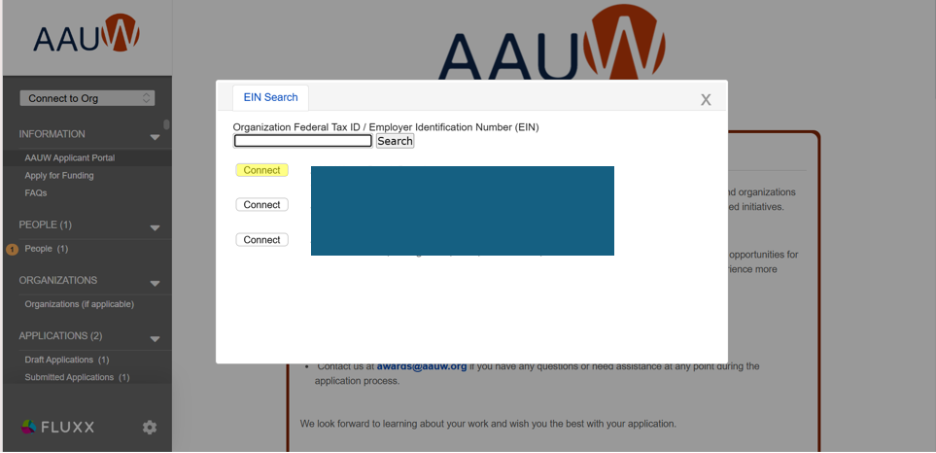
- The person who is associated with your organization’s account in Fluxx will approve your request to connect. If this person does not have access to their Fluxx account, please submit a ticket.
- Once you have been approved to connect to your organization, you should be able to see the option to apply for the Community Action Grant under the “Apply for Funding” page.
Was this article helpful?
That’s Great!
Thank you for your feedback
Sorry! We couldn't be helpful
Thank you for your feedback
Feedback sent
We appreciate your effort and will try to fix the article